Both the Community Edition of VPP and Edy's Vehicle Physics use the standard Unity Input settings (Edit > Project Settings > Input):
- Steering must work as the Horizontal axis. Configure Dead = 0 to remove the null zone near the center.
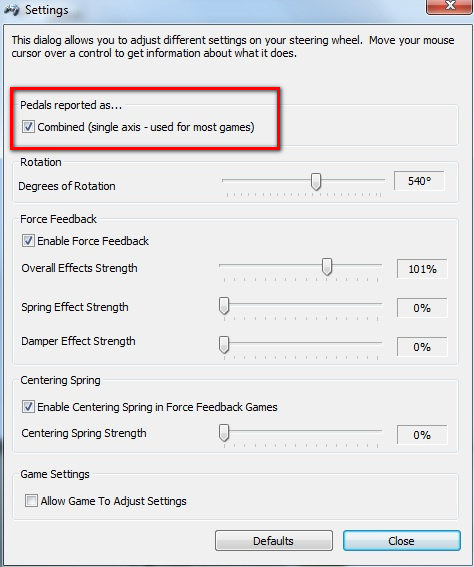
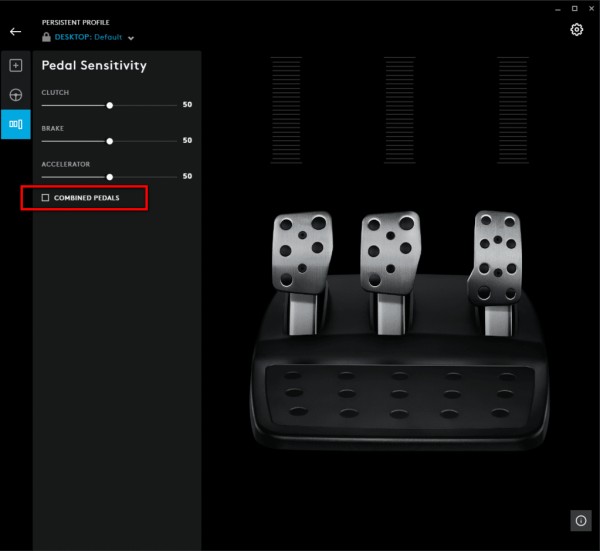
- Gas and Brake pedals must be configured to work with the Vertical axis. For this, you must enable the feature Combined Pedals (ir might be named differently) in the Logitech control panel. This way Gas would be the positive Vertical direction, and Brake would be the negative Vertical direction.
In the device settings for the G27 the option is Pedals reported as... Combined (single axis):
For the G29 the procedure is similar:
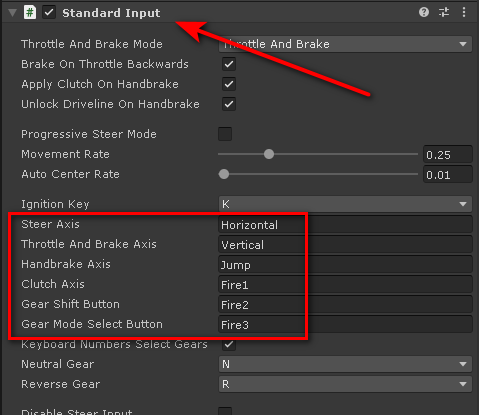
In Vehicle Physics Pro, the actual axes of Unity Input used by the vehicle may be configured in the Standard Input component:
Note that the paid editions of Vehicle Physics Pro include native support for DirectInput, which allows using gas and brake pedals independently.